إظهار الرسائل ذات التسميات ايفون. إظهار كافة الرسائل
إظهار الرسائل ذات التسميات ايفون. إظهار كافة الرسائل
طريقة تحميل برامج مكركه+ تثبيتها عالايفون والايباد والايبود
Posted by Unknown on 3:16 م
بسم الله نبدأ
=======================
اولاً نحتاج اداه appsync ios6
نجدها في سورس : myrepospace/Bl00dra1n
ولا تنسون بنهاية السورس علامة ( / )
بعد تحميل الاداه نتجه للكمبيوتر لتحميل التطبيقات والالعاب والبرامج المكركه
وحاب اشكر آخ bilal.23
اللي جاب لنا المواقع هذي عشان نحمل منها البرامج
==========================
1- أول موقع هو HEAVEN STORE IPHONE
Store Heaven iPhone For Everyone
2- ثاني موقع هو IPA STORE
iPAST0RE
3- ثالث موقع هو APP CAKE
AppCake | iPhone Games & Apps Index and Free Download
4- رابع موقع هو KUL APPS
KulApps | Best iPad iPod iPhone ipa games, apps download
===============================
بعد البحث بالمواقع عن البرامج التي تريد
وتحميلها عالكمبيوتر يسظهر البرنامج بصيغة ipa بهذا الشكل

بعد كذا نقوم بالتثبيت عن طريق الايتولز
نوصل الايفون بالكمبيورتر
ونفتح الايتولز
 | اضغط هنا لمشاهدة الصورة بحجمها الاصلي |

1- نروح application
2- نروح للسهم الاخضر النازل
| اضغط هنا لمشاهدة الصورة بحجمها الاصلي |

راح تظهر هذي النافذة , نروح للبرنامج اللي نزلناه ونضغط عليه مرتين
| اضغط هنا لمشاهدة الصورة بحجمها الاصلي |

راح يظهر هذا الشرييط اذا صار 100%
تلاقي البرنامج في الجهاز حقك
رابط تحميل الايتولز : iTools0913E
==============================
شرح كيفية تحميل وإستخدام برامج بديلة لبرنامج الإنستولس لتحميل البرامج من الجيلبريك ( vShare – AppCake )
Posted by Unknown on 3:10 م


قبل عدة أيام أعلن القائمون على البرنامج الشهير ( انستولس – installous ) الخاص بتحميل البرامج بشكل مجاني من الجيلبريك عن توقفه بشكل دائم. وبما أن الكثير يعتمدون على الانستولس لتحميل التطبيقات فـ سوف نعرض لكم اليوم برامج تعتبر بديلة وتغني عن الانستولس وكلها تركب على الايباد والايفون والايبود تتش
البرنامج الأول
AppCake+
لكي تحصل على هذا البرنامج تحتاج إلى إضافة السورس الخاص به في السيديا .. افتح السيديا ثم اذهب إلى صفحة السورسات ثم اضف السورس
Cydia >> sources >> edit >> add
cydia.iphonecake.com

بعد إضافة السورس .. تضغط عليه وتحمل التطبيق وتتبع الخطوات الموجودة في الصور


كذا تكون خلاص حملت البرنامج من السيديا .. تفتح البرنامج وهذا هي الواجهه الرئيسية للبرنامج

هذي الصورة توضح طريقة تحميل البرامج من البرنامج

* * * *
البرنامج الثاني
vShare
بالنسبة لطريقة تثبيت برنامج (في شير – vShare ) فهي سهلة جداً وتتم عن طريق المتصفح سفاري .. كل اللي عليك هو أنك تفتح الرابط هذا في متصفح الايباد او الايفون
بعد ماتفتح الرابط بيكون شكل الموقع قدامك زي كذا

تضغط على كلمة Download المحددة في الصورة
بتطلع لك رسالة على الشاشة .. تضغط على تثبيت

وبعد كذا بيتحمل البرنامج مباشرة عندك سواء كان جهازك ايفون او ايباد او ايبود تتش 

وبكذا تكون خلصت 
* * * *
ملاحظة : في حال ماضبط معك تحميل برنامج vShare من المتصفح، فـ افتح الموقع من اللاب توب وحمل التطبيق عليه وبعد كذا تشبك جهازك الايباد او الايفون وتثبت التطبيق من خلال برنامج الآي تولز 
شرح برنامج iBlacklist لحظر المكالمات والرسائل الغير مرغوب بها
Posted by Unknown on 11:33 ص
iBlacklist

فكرة البرنامج :
حظر المكالمات الواردة والرسائل القصيرة الغير مرغوب بها ... بعدة طرق ... تاتيكم في الشرح
واجهة البرنامج :


نبدا الشرح باذن الله:
عند الضغط على خيار Enable تاتي القائمة التاليه :
وتحوي خيار تفعيل حجب المكالمات Calls والرسائل القصيرة SMS والرسائل المصورة MMS
وتحوي خيار تفعيل حجب المكالمات Calls والرسائل القصيرة SMS والرسائل المصورة MMS

Blacklists : وتحوي الارقام المرغوب بحظرها اثناء الاتصال

Whitelists : تحوي الارقام المراد استقبالها فقط ...

View History : مشاهدة السجل وتحوي المكالمات الواردة المحجوبة او المسجات المحجوبة

Active Lists : من هذه القائمة بالامكان تشغيل او ايقاف تشغيل قوائم الحظر او السماح

Action Setup : خيارات الحظر هام جدا
وتحوي عدة خيارات ... اثناء اتصال شخص قمت بحظره ...ماذا سوف يظهر عنده ؟
وتحوي عدة خيارات ... اثناء اتصال شخص قمت بحظره ...ماذا سوف يظهر عنده ؟
Voice Mail : بريد صوتي
Busy Signal : يطلعله ان خطك مشغول
Accept And Hangup : فتح الخط واغلاقه ( حلوة )
No Action : لا تسوي شي
Accept : استقبل المكالمة
Busy Signal : يطلعله ان خطك مشغول
Accept And Hangup : فتح الخط واغلاقه ( حلوة )
No Action : لا تسوي شي
Accept : استقبل المكالمة

Call Settings : تحوي اعدادات الاتصال
Save History : حفظ سجل المكالمات والرسائل الواردة المحجوبة
Delete Recent Calls : حذف المكالمات الحالية
Address Book Only : للحظر من قائمة الاسماء فقط
Show Status Bar Icon : وضع شعار فوق عند الساعة عند تشغيل البرنامج
Sound Notify : تنبيه صوتي عند ورود مكالمة او مسج محظورة
Vibrate : تشغيل الاهتزاز عند ورود مكالمة او مسج محظورة
Delete Recent Calls : حذف المكالمات الحالية
Address Book Only : للحظر من قائمة الاسماء فقط
Show Status Bar Icon : وضع شعار فوق عند الساعة عند تشغيل البرنامج
Sound Notify : تنبيه صوتي عند ورود مكالمة او مسج محظورة
Vibrate : تشغيل الاهتزاز عند ورود مكالمة او مسج محظورة

No Identifications Callers :
Block Restricted ID : حجب الارقام زي Private Number
Block Unkown ID : حجب الارقام الغير معروفة
Block Unkown ID : حجب الارقام الغير معروفة
Block Call With Less Than :
Digits : حجب المكالمة للارقام التي عددها اقل من عدد معين انت تختاره
When Blocking Calls
Autoreply SMS : عند حجب المكالمة ارسل رسالة معينة انت تكبتها

Messeage Settings : نفس الاعدادات الخاصة بالاتصال
Password : لوضع باسورد للبرنامج وعدم الدخول والتعديل بالخيارات بدون الباسورد

Camo : لتغيير ايقونة البرنامج

Force Messages App : في حال ورود مسج محظورة وبرنامج المسجات الاساسي الخاص بالجهاز مفتوح
عند تفعيل هذا الخيار فان ال iblacklist فور يحجب المسج ويمنعها من الظهور ببرنامج المسجات الاساسي اثناء فتحه
عند تفعيل هذا الخيار فان ال iblacklist فور يحجب المسج ويمنعها من الظهور ببرنامج المسجات الاساسي اثناء فتحه

البرنامج موجود باخر نسخة تعمل على الايفون فور وعلى النظام 4.1
على السورس : Sinfuliphonerepo.com
على السورس : Sinfuliphonerepo.com
تم والحمد الله
طريقه تحميل تطبيقات الايفون على الكمبيوتر ونقلها للايفون
Posted by Unknown on 3:17 ص
بسم الله الرحمن الرحيم
الدخول إلى اي موقع لتحميل تطبيقات الايفون
هالموقع تلاقي فيه الالعاب و البرامج الموجودة بالانتسليوز http://apptrackr.org/
بعد تنزيل التطبيقات
تثبيت برناامج لاظهار ملفات الايفون ع الكمبيوتر
برامج كثيرة تظهر لك ملفات الآيفون على الكمبيوتر منها ال iPhone Folders و فيه غيره لكن هذا رهيب و يجيب لك الآيفون كانه فلاش ميموري
بعد ان تثبت البرنامج اشبك الآيفون و اذهب للمسار التالي
\var\mobile\Documents\Installous\Downloads
الصق البرامج و الالعاب
بعد ان تثبت البرنامج اشبك الآيفون و اذهب للمسار التالي
\var\mobile\Documents\Installous\Downloads
الصق البرامج و الالعاب
ثم من الآيفون شغل برنامج الانتسليوز و اذهب ل Download بتلاقيهم ثبتهم عادي
تحميل RedSn0w 0.9.12b2 مع ميزة جديدة عند الجيلبريك غير المقيد iOS 5.1.1
Posted by Unknown on 10:07 م
جيلبريك iOS 5.1.1 غير مقيد بواسطة Redsn0w 0.9.12b1
الخطوة 1: عليك تحميل Redsn0w 0.9.12b1 من الرابط هنا.
الخطوة 2: أوصل جهازك الذي يعمل بنظام iOS 5.1.1 بالحاسوب
الخطوة 3: الآن إضغط على كلمة Jailbreak ثم إنتظر حتى يعيد تشغيل الجهاز، ثم عمل ريسبرينج.
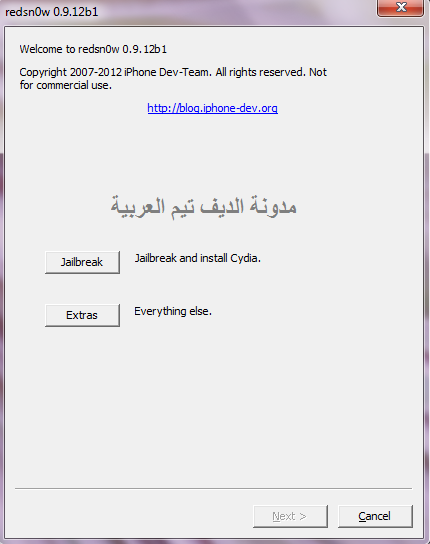
الخطوة 4: بعد أن يعيد تشغيل الجهاز ستظهر السيديا على احد صفحات جهازك، الآن عند تشغيلها سيكون عليك إختيار User والإنتظار قليلاً.
هذا كل شيء، أعتقد أن الأمر بغاية البساطة، أليس كذلك ؟ حسناً، إذا نجح معك الجيلبريك بواسطة الأداة السابقة فلا داعي أبداً للقيام بالجيلبريك بواسطة هذه الأداة.
iJailbreak Downloads Section
Posted by Unknown on 8:51 م
Welcome to iJailbreak’s Downloads Section. In this section you will find download links to jailbreaking tools such as Absinthe, Ac1dSn0w, PwnageTool, RedSn0w, Sn0wBreeze, GreenPois0n, Seas0nPass, JailbreakMe and more! We will also be including download links to important utilities likeChronic-Dev Crash Reporter, iFaith, TinyUmbrella and F0recast.
Hit the Facebook LIKE button if you would like to know when new Jailbreak Tools and New Firmware Versions are released
Note #1: Updates will be posted as new jailbreaking tools are released. Also, if a jailbreaking tool’s name is in bold it means that it’s the latest version available.
Note #2: If you see a broken link please let us know by clicking here.

Absinthe is a new jailbreaking software that was released by the Dream Team to Jailbreak the iPhone 4S and iPad 2 Untethered running the iOS 5.0/iOS 5.0.1 firmware.
Absinthe 0.2: Windows Download | Mac OS X Download
Absinthe 0.1: Windows Download
Absinthe 0.1.2.-2: Mac OS X Download
Absinthe 0.1.2.-1: Mac OS X Download
CLI (Cinject 0.5.4): Windows Download | Mac OS X Download

Ac1dSn0w is a new jailbreaking tool by the PwnDevTeam. The Ac1dSn0w jailbreaking tool is just like the RedSn0w jailbreaking tool but includes some new features such as exiting recovery mode. You can download the latest version of Ac1dSn0w below.
Ac1dSn0w Beta 2 (iOS 5/iOS 5.0.1): Mac OS X Download
Ac1dSn0w Beta 1 (iOS 5/iOS 5.0.1): Mac OS X Download

PwnageTool is a MAC OS X only jailbreaking tool that jailbreaks your iOS iDevice by creating a custom IPSW (Apple’s Firmware File); once this IPSW is created you must restore it to your iDevice through iTunes.
PwnageTool 5.1.1 (iOS 5.1.1): Mac OS X Download
PwnageTool 5.0.1 (iOS 5.0.1): Mac OS X Download
PwnageTool 4.3.3.1 (iOS 4.3.3): Mac OS X Download
PwnageTool 4.3.3 (iOS 4.3.3): Mac OS X Download
PwnageTool 4.3.2 (iOS 4.3.2): Mac OS X Download
PwnageTool 4.3 (iOS 4.3.1): Mac OS X Download
PwnageTool 4.2 (iOS 4.2.1/4.2.6): Mac OS X Download
PwnageTool 4.1.3 (Unlock Edition): Mac OS X Download
PwnageTool 4.2.1: Mac OS X Download
PwnageTool 4.01: Mac OS X Download

Sn0wBreeze is actually the Windows alternative to the PwnageTool. It functions and operates the exact same way as the PwnageTool – Sn0wBreeze jailbreaks your iOS iDevice by creating a custom IPSW (Apple’s Firmware File); once this IPSW is created you must restore it to your iDevice through iTunes.
Sn0wBreeze 2.9.6: Windows Download
Sn0wBreeze 2.9.5: Windows Download
Sn0wBreeze 2.9.4: Windows Download
Sn0wBreeze 2.9.3 (4.4.3/4.4.4 Apple TV 2G): Windows Download
Sn0wBreeze 2.9.2 (iOS 5.1): Windows Download
Sn0wBreeze 2.9.1 (iOS 5.0.1): Windows Download
Sn0wBreeze 2.9 (iOS 5.0.1): Windows Download
Sn0wBreeze 2.8b11 (iOS 5.0.1): Windows Download
Sn0wBreeze 2.8b10 (iOS 5.0/5.0.1-b2): Windows Download
Sn0wBreeze 2.8b9 (iOS 5.0/5.0.1-b1): Windows Download
Sn0wBreeze 2.8b8 (iOS 5 GM): Windows Download
Sn0wBreeze 2.8b7 (iOS 5 beta 7): Windows Download
Sn0wBreeze 2.8b6 (iOS 5 beta 6): Windows Download
Sn0wBreeze 2.8b5 (iOS 5 beta 5): Windows Download
Sn0wBreeze 2.8b4 (iOS 5 beta 3): Windows Download
Sn0wBreeze 2.8b3 (iOS 5 beta 2): Windows Download
Sn0wBreeze 2.7.3 (iOS 4.2.8/4.3.3): Windows Download
Sn0wBreeze 2.7.2 (iOS 4.3 Build 8F305 Apple TV 2G): Windows Download

RedSn0w (originally named QuickPwn) was re-released during the times of the 2.x.x firmware generation, as one of the first jailbreaking tools to jailbreak the iPod Touch 2G. Maintained and created by the Dev-Team, RedSn0w has become one of the most used jailbreaking tools to jailbreakthe iOS firmware.
RedSn0w 0.9.14b2: Windows Download (Run in Administrator mode)| Mac OS X Download
RedSn0w 0.9.14b1: Windows Download (Run in Administrator mode)| Mac OS X Download
RedSn0w 0.9.13dev3: Windows Download (Run in Administrator mode)| Mac OS X Download
RedSn0w 0.9.13dev2: Windows Download (Run in Administrator mode)| Mac OS X Download
RedSn0w 0.9.13dev1: Windows Download (Run in Administrator mode)| Mac OS X Download
RedSn0w 0.9.12b2: Windows Download (Run in Administrator mode)| Mac OS X Download
RedSn0w 0.9.12b1: Windows Download (Run in Administrator mode)| Mac OS X Download
RedSn0w 0.9.11b4: Windows Download (Run in Administrator mode)| Mac OS X Download
RedSn0w 0.9.11b3: Windows Download (Run in Administrator mode)| Mac OS X Download
RedSn0w 0.9.11b2: Windows Download (Run in Administrator mode)| Mac OS X Download
RedSn0w 0.9.11b1: Windows Download (Run in Administrator mode)| Mac OS X Download
RedSn0w 0.9.10b8b: Windows Download (Run in Administrator mode)| Mac OS X Download
RedSn0w 0.9.10b8: Windows Download (Run in Administrator mode)| Mac OS X Download
RedSn0w 0.9.10b7: Windows Download (Run in Administrator mode)| Mac OS X Download
RedSn0w 0.9.10b6b: Mac OS X Download
RedSn0w 0.9.10b6: Windows Download (Run in Administrator mode)| Mac OS X Download
RedSn0w 0.9.10b5c: Windows Download (Run in Administrator mode)| Mac OS X Download
RedSn0w 0.9.10b5: Windows Download (Run in Administrator mode)| Mac OS X Download
RedSn0w 0.9.10b4: Windows Download (Run in Administrator mode)| Mac OS X Download
RedSn0w 0.9.10b3: Windows Download (Run in Administrator mode)| Mac OS X Download
RedSn0w 0.9.10b2: Windows Download (Run in Administrator mode)| Mac OS X Download
RedSn0w 0.9.10b1: Windows Download (Run in Administrator mode)| Mac OS X Download
RedSn0w CLI 0.4.3: Windows Download

GreenPois0n jailbreaking tool was first released on October 12th, 2010 and it was one of the first jailbreaking tools to jailbreak the iOS 4.1 firmware. GreenPois0n is a one click jailbreaking tool; meaning that all you need to do to jailbreak your iDevice is click a button.
GreenPois0n RC6.1: Windows Download | Mac OS X Download
GreenPois0n RC6: Windows Download | Mac OS X Download
GreenPois0n RC5b4: Windows Download | Mac OS X Download
GreenPois0n RC5: Windows Download | Mac OS X Download
GreenPois0n RC4: Windows Download | Mac OS X Download
GreenPois0n RC3.3: Linux Download

Seas0nPass is an Apple TV 2G specific jailbreak tool created by the FireCore development team.
Seas0nPass: Windows Download | Mac OS X Download - “Seas0nPass provides an UNTETHERED jailbreak of the 2nd gen Apple TV running the latest 5.0.2 (iOS 5.1.2 – 9B830) software that was released on June 5th, 2012.”
Seas0nPass (05/10/12): Windows Download | Mac OS X Download
Seas0nPass (03/30/12): Windows Download | Mac OS X Download
Seas0nPass (02/21/12): Windows Download | Mac OS X Download
Seas0nPass (12/30/11): Windows Download | Mac OS X Download
Seas0nPass (12/16/11): Windows Download | Mac OS X Download
Seas0nPass (11/18/11): Windows Download | Mac OS X Download
Seas0nPass (10/24/11): Windows Download | Mac OS X Download
Seas0nPass (10/12/11, 10/17/11): Windows Download | Mac OS X Download
Seas0nPass (08/19/11): Windows Download | Mac OS X Download

JailbreakMe is a userland jailbreak. Meaning that all you need to do to jailbreak your iDevice is visitJailbreakMe.com and just like that your iDevice will be Jailbroken. This jailbreak works on all iDevices running up to the iOS 4.3.3 firmware.
JailbreakMe 3.0: JailbreakMe Download
JailbreakMe 2.0: JailbreakMe Download


LimeRa1n: Windows Download | Mac OS X Download


Download h1siri-1.0.1.deb Cydia tweak (Click here for more information)
Download Siri GUI Files (Click here for more information)

TinyUmbrella is an SHSH saving tool that allows you to downgrade your iDevice’s firmware version to a lower version than you are currently running. This can often times be helpful in case you accidentally update to a firmware version that cannot be jailbroken; as by default Apple does not allow downgrading.
TinyUmbrella 5.11.01: Windows Download | Mac OS X Download
TinyUmbrella 5.11.00b: Windows Download | Mac OS X Download
TinyUmbrella 5.11.00: Windows Download | Mac OS X Download
TinyUmbrella 5.10.15: Windows Download | Mac OS X Download
TinyUmbrella 5.10.14: Windows Download | Mac OS X Download
TinyUmbrella 5.10.13: Windows Download | Mac OS X Download
TinyUmbrella 5.10.12: Windows Download | Mac OS X Download
TinyUmbrella 5.10.11: Windows Download | Mac OS X Download
TinyUmbrella 5.10.10: Windows Download | Mac OS X Download
TinyUmbrella 5.10.09: Windows Download | Mac OS X Download
TinyUmbrella 5.10.08: Windows Download | Mac OS X Download
TinyUmbrella 5.10.07: Windows Download | Mac OS X Download
TinyUmbrella 5.10.06: Windows Download | Mac OS X Download
TinyUmbrella 5.10.05: Windows Download | Mac OS X Download
TinyUmbrella Fix Recovery: Windows Download | Mac OS X Download

Chronic Dev have just released a new tool called the Chronic-Dev Crash Reporter that a will send crash reports to Chronic Dev’s private servers. This will help Chronic Dev develop an untethered iOS 5.0 Jailbreak the the iPhone 4S, iPad 2 and other iOS devices.
Chronic-Dev Crash Reporter Final: Mac OS X Download | Windows Download
Chronic-Dev Crash Reporter 1.0 Beta: Mac OS X Download | Windows Download

DingleBerry 3.1.0: Windows Download | Linux Download
DingleBerry 3.0.2: Mac OS X Download
DingleBerry 3.01: Windows Download | Mac OS X Download | Linux Download
DingleBerry 3: Windows Download | Mac OS X Download
DingleBerry Beta 2.11: Windows Download
DingleBerry Beta 0.5.1: Windows Download
Note: This is for experienced users ONLY.

iFaith is an SHSH saving tool that dumps SHSH blobs directly on to your iDevice. Dumping your SHSH blobs allows you to downgrade your iDevice’s firmware version to a lower version than you are currently running. This can often times be helpful in case you accidentally update to a firmware version that cannot be jailbroken; as by default Apple does not allow downgrading.
iFaith 1.4.2: Windows Download
iFaith 1.4.1: Windows Download
iFaith 1.4: Windows Download
iFaith 1.3.2: Windows Download
iFaith 1.3.1: Windows Download
iFaith 1.3: Windows Download
iFaith 1.2.1: Windows Download
iFaith 1.2: Windows Download
iFaith 1.1: Windows Download
iFaith 1.0: Windows Download

RecBoot is an application that easily kicks your iPhone, iPod Touch or iPad out of Recovery Mode and also puts your iPhone, iPod Touch or iPad into Recovery Mode.
RecBoot v2.2: Mac OS X Download
RecBoot v1.3: Windows Download | Linux Download
RecBoot v1.1: Windows Download
RecBoot v1.0.2 Mac OS X Download
RecBoot Source Code: Download
iOSOpenDev
iOSOpenDev 1.0.1 (05-Feb-2012): Mac OS X Download
iOSOpenDev 1.0 (04-Feb-2012): Mac OS X Download

iREB r5 (For iOS 3.x.x to 5.x.x): Windows Download

iDetector v1.0.1 (For iPhone 3GS): Windows Download

TinyCFW: Windows Download | Mac OS X Download

F0recast is a handy tool that will tell you information about your iDevice. For example: whether or not it can be jailbroken/unlocked.
F0recast 1.3: Windows Download | Mac OS X Download

BootLoaders: BL 3.9 Download | BL 4.6 Download

iPhone 2G
WhiteD00r 5.1: iPhone 2G Normal 5.1 Download | iPhone 2G Unlocker 5.1 Download
iPhone 3G
WhiteD00r 5.1: iPhone 3G Normal 5.1 Download | iPhone 3G Unlocker 5.1 Download
iPod Touch 1G
WhiteD00r 5.1: iPod Touch 1G WD5.1 Download
iPod Touch 2G
WhiteD00r 5.1: iPod Touch 2G WD5.1 Download

ipswDownloader allows you to easily download firmware files for your iDevice from an easy to use GUI (graphical user interface). Additionally the tool tells you whether or not the firmware you aredownloading can be jailbroken or Unlocked.
ipswDownloader 0.5: Windows Download | Mac OS X Download (32 bit) | Mac OS X Download (64 bit)

iTunes 10.5.3: Windows Download | Mac OS X Download | Windows (64-bit) Download| Mac OS X (64-bit) Download
iTunes 10.5.2: Windows Download | Mac OS X Download | Windows (64-bit) Download | Mac OS X (64-bit) Download
iTunes 10.5.1: Windows Download | Mac OS X Download | Windows (64-bit) Download | Mac OS X (64-bit) Download
iTunes 10.5: Windows Download | Mac OS X Download | Windows (64-bit) Download | Mac OS X (64-bit) Download
iTunes 10.4.1: Windows Download | Mac OS X Download | Windows (64-bit) Download | Mac OS X (64-bit) Download
iTunes 10.4: Windows Download | Mac OS X Download | Windows (64-bit) Download | Mac OS X (64-bit) Download
iTunes 10.3.1: Windows Download | Mac OS X Download | Windows (64-bit) Download | Mac OS X (64-bit) Download
iTunes 10.3: Windows Download | Mac OS X Download | Windows (64-bit) Download | Mac OS X (64-bit) Download
iTunes 10.2.2: Windows Download | Mac OS X Download | Windows (64-bit) Download | Mac OS X (64-bit) Download
iTunes 10.2.1: Windows Download | Mac OS X Download | Windows (64-bit) Download | Mac OS X (64-bit) Download
iTunes 10.2: Windows Download | Mac OS X Download | Windows (64-bit) Download | Mac OS X (64-bit) Download
iTunes 10.1.2: Windows Download | Mac OS X Download | Windows (64-bit) Download | Mac OS X (64-bit) Download
iTunes 10.1.1: Windows Download | Mac OS X Download | Windows (64-bit) Download | Mac OS X (64-bit) Download
iTunes 10.1: Windows Download | Mac OS X Download | Windows (64-bit) Download | Mac OS X (64-bit) Download

Safari 5.1.2 : Mac OS X Download | Windows Download
Safari 5.1.1: Mac OS X Download | Windows Download
Safari 5.1: Mac OS X Download | Windows Download
Safari 5.0.6: Mac OS X Download
Safari 5.0.5: Mac OS X Download | Windows Download
Safari 5.0.4: Mac OS X Download | Windows Download
Safari 5.0.3: Mac OS X Download | Windows Download
Safari 5.0.2: Mac OS X Download | Windows Download
Safari 5.0.1: Mac OS X Download | Windows Download
Safari 5.0: Mac OS X Download | Windows Download

1.0.0: iPhone1,1_1.0_1A543a_Restore.ipsw
1.0.1: iPhone1,1_1.0.1_1C25_Restore.ipsw
1.0.2: iPhone1,1_1.0.2_1C28_Restore.ipsw
1.1.1: iPhone1,1_1.1.1_3A109a_Restore.ipsw
1.1.2: iPhone1,1_1.1.2_3B48b_Restore.ipsw
1.1.3: iPhone1,1_1.1.3_4A93_Restore.ipsw
1.1.4: iPhone1,1_1.1.4_4A102_Restore.ipsw
2.0.0 (2G): iPhone1,1_2.0_5A347_Restore.ipsw
2.0.0 (3G): iPhone1,2_2.0_5A347_Restore.ipsw
2.0.1 (2G): iPhone1,1_2.0.1_5B108_Restore.ipsw
2.0.1 (3G): iPhone1,2_2.0.1_5B108_Restore.ipsw
2.0.2 (2G): iPhone1,1_2.0.2_5C1_Restore.ipsw
2.0.2 (3G): iPhone1,2_2.0.2_5C1_Restore.ipsw
2.1.0 (2G): iPhone1,1_2.1_5F136_Restore.ipsw
2.1.0 (3G): iPhone1,2_2.1_5F136_Restore.ipsw
2.2.0 (2G): iPhone1,1_2.2_5G77_Restore.ipsw
2.2.0 (3G): iPhone1,2_2.2_5G77_Restore.ipsw
2.2.1 (2G): iPhone1,1_2.2.1_5H1_Restore.ipsw
2.2.1 (3G): iPhone1,2_2.2.1_5H11_Restore.ipsw
3.0.0 (2G): iPhone1,1_3.0_7A341_Restore.ipsw
3.0.0 (3G): iPhone1,2_3.0_7A341_Restore.ipsw
3.0.0 (3GS): iPhone2,1_3.0_7A341_Restore.ipsw
3.0.1 (2G): iPhone1,1_3.0.1_7A400_Restore.ipsw
3.0.1 (3G): iPhone1,2_3.0.1_7A400_Restore.ipsw
3.0.1 (3GS): iPhone2,1_3.0.1_7A400_Restore.ipsw
3.1.0 (2G): iPhone1,1_3.1_7C144_Restore.ipsw
3.1.0 (3G): iPhone1,2_3.1_7C144_Restore.ipsw
3.1.0 (3GS): iPhone2,1_3.1_7C144_Restore.ipsw
3.1.2 (2G): iPhone1,1_3.1.2_7D11_Restore.ipsw
3.1.2 (3G): iPhone1,2_3.1.2_7D11_Restore.ipsw
3.1.2 (3GS): iPhone2,1_3.1.2_7D11_Restore.ipsw
3.1.3 (2G): iPhone1,1_3.1.3_7E18_Restore.ipsw
3.1.3 (3G): iPhone1,2_3.1.3_7E18_Restore.ipsw
3.1.3 (3GS): iPhone2,1_3.1.3_7E18_Restore.ipsw
4.0.0 (3G): iPhone1,2_4.0_8A293_Restore.ipsw
4.0.0 (3GS): iPhone2,1_4.0_8A293_Restore.ipsw
4.0.0 (4): iPhone3,1_4.0_8A293_Restore.ipsw
4.0.1 (3G): iPhone1,2_4.0.1_8A306_Restore.ipsw
4.0.1 (3GS): iPhone2,1_4.0.1_8A306_Restore.ipsw
4.0.1 (4): iPhone3,1_4.0.1_8A306_Restore.ipsw
4.0.2 (3G): iPhone1,2_4.0.2_8A400_Restore.ipsw
4.0.2 (3GS): iPhone2,1_4.0.2_8A400_Restore.ipsw
4.0.2 (4): iPhone3,1_4.0.2_8A400_Restore.ipsw
4.1.0 (3G): iPhone1,2_4.1_8B117_Restore.ipsw
4.1.0 (3GS): iPhone2,1_4.1_8B117_Restore.ipsw
4.1.0 (4): iPhone3,1_4.1_8B117_Restore.ipsw
4.2.1 (3G): iPhone1,2_4.2.1_8C148_Restore.ipsw
4.2.1 (3GS): iPhone2,1_4.2.1_8C148a_Restore.ipsw
4.2.1 (4): iPhone3,1_4.2.1_8C148_Restore.ipsw
4.2.6 (4 CDMA): iPhone3,3_4.2.6_8E200_Restore.ipsw
4.3.0 (3GS): iPhone2,1_4.3_8F190_Restore.ipsw
4.3.0 (4 GSM): iPhone3,1_4.3_8F190_Restore.ipsw
4.3.1 (3GS): iPhone2,1_4.3.1_8G4_Restore.ipsw
4.3.1 (4 GSM): iPhone3,1_4.3.1_8G4_Restore.ipsw
4.3.2 (3GS): iPhone2,1_4.3.2_8H7_Restore.ipsw
4.3.2 (4 GSM): iPhone3,1_4.3.2_8H7_Restore.ipsw
4.2.7 (4 CDMA): iPhone3,3_4.2.7_8E303_Restore.ipsw
4.2.8 (4 CDMA): iPhone3,3_4.2.8_8E401_Restore.ipsw
4.3.3 (3GS): iPhone2,1_4.3.3_8J2_Restore.ipsw
4.3.3 (4 GSM): iPhone3,1_4.3.3_8J2_Restore.ipsw
4.2.9 (4 CDMA): iPhone3,3_4.2.9_8E501_Restore.ipsw
4.3.4 (3GS): iPhone2,1_4.3.4_8K2_Restore.ipsw
4.3.4 (4 GSM): iPhone3,1_4.3.4_8K2_Restore.ipsw
4.2.10 (4 CDMA): iPhone3,3_4.2.10_8E600_Restore.ipsw
4.3.5 (3GS): iPhone2,1_4.3.5_8L1_Restore.ipsw
4.3.5 (4 GSM): iPhone3,1_4.3.5_8L1_Restore.ipsw
5.0 (3GS): iPhone2,1_5.0_9A334_Restore.ipsw
5.0 (4 GSM): iPhone3,1_5.0_9A334_Restore.ipsw
5.0 (4 CDMA): iPhone3,3_5.0_9A334_Restore.ipsw
5.0 (4S): iPhone4,1_5.0_9A334_Restore.ipsw
5.0.1 (3GS): iPhone2,1_5.0.1_9A405_Restore.ipsw
5.0.1 (4 GSM): iPhone3,1_5.0.1_9A405_Restore.ipsw
5.0.1 (4 CDMA): iPhone3,3_5.0.1_9A405_Restore.ipsw
5.0.1 (4S): iPhone4,1_5.0.1_9A405_Restore.ipsw
5.0.1 (4S) [9A406]: iPhone4,1_5.0.1_9A406_Restore.ipsw
5.1.0 (3GS): iPhone2,1_5.1_9B176_Restore.ipsw
5.1.0 (4 GSM): iPhone3,1_5.1_9B176_Restore.ipsw
5.1.0 (4 CDMA): iPhone3,3_5.1_9B176_Restore.ipsw
5.1.0 (4S): iPhone4,1_5.1_9B179_Restore.ipsw
5.1.1 (3GS): iPhone2,1_5.1.1_9B206_Restore.ipsw
5.1.1 (4 GSM): iPhone3,1_5.1.1_9B206_Restore.ipsw
5.1.1 (4 GSM Build 9B208): iPhone3,1_5.1.1_9B208_Restore.ipsw
5.1.1 (4 CDMA): iPhone3,3_5.1.1_9B206_Restore.ipsw
5.1.1 (4S): iPhone4,1_5.1.1_9B206_Restore.ipsw
1.0.1: iPhone1,1_1.0.1_1C25_Restore.ipsw
1.0.2: iPhone1,1_1.0.2_1C28_Restore.ipsw
1.1.1: iPhone1,1_1.1.1_3A109a_Restore.ipsw
1.1.2: iPhone1,1_1.1.2_3B48b_Restore.ipsw
1.1.3: iPhone1,1_1.1.3_4A93_Restore.ipsw
1.1.4: iPhone1,1_1.1.4_4A102_Restore.ipsw
2.0.0 (2G): iPhone1,1_2.0_5A347_Restore.ipsw
2.0.0 (3G): iPhone1,2_2.0_5A347_Restore.ipsw
2.0.1 (2G): iPhone1,1_2.0.1_5B108_Restore.ipsw
2.0.1 (3G): iPhone1,2_2.0.1_5B108_Restore.ipsw
2.0.2 (2G): iPhone1,1_2.0.2_5C1_Restore.ipsw
2.0.2 (3G): iPhone1,2_2.0.2_5C1_Restore.ipsw
2.1.0 (2G): iPhone1,1_2.1_5F136_Restore.ipsw
2.1.0 (3G): iPhone1,2_2.1_5F136_Restore.ipsw
2.2.0 (2G): iPhone1,1_2.2_5G77_Restore.ipsw
2.2.0 (3G): iPhone1,2_2.2_5G77_Restore.ipsw
2.2.1 (2G): iPhone1,1_2.2.1_5H1_Restore.ipsw
2.2.1 (3G): iPhone1,2_2.2.1_5H11_Restore.ipsw
3.0.0 (2G): iPhone1,1_3.0_7A341_Restore.ipsw
3.0.0 (3G): iPhone1,2_3.0_7A341_Restore.ipsw
3.0.0 (3GS): iPhone2,1_3.0_7A341_Restore.ipsw
3.0.1 (2G): iPhone1,1_3.0.1_7A400_Restore.ipsw
3.0.1 (3G): iPhone1,2_3.0.1_7A400_Restore.ipsw
3.0.1 (3GS): iPhone2,1_3.0.1_7A400_Restore.ipsw
3.1.0 (2G): iPhone1,1_3.1_7C144_Restore.ipsw
3.1.0 (3G): iPhone1,2_3.1_7C144_Restore.ipsw
3.1.0 (3GS): iPhone2,1_3.1_7C144_Restore.ipsw
3.1.2 (2G): iPhone1,1_3.1.2_7D11_Restore.ipsw
3.1.2 (3G): iPhone1,2_3.1.2_7D11_Restore.ipsw
3.1.2 (3GS): iPhone2,1_3.1.2_7D11_Restore.ipsw
3.1.3 (2G): iPhone1,1_3.1.3_7E18_Restore.ipsw
3.1.3 (3G): iPhone1,2_3.1.3_7E18_Restore.ipsw
3.1.3 (3GS): iPhone2,1_3.1.3_7E18_Restore.ipsw
4.0.0 (3G): iPhone1,2_4.0_8A293_Restore.ipsw
4.0.0 (3GS): iPhone2,1_4.0_8A293_Restore.ipsw
4.0.0 (4): iPhone3,1_4.0_8A293_Restore.ipsw
4.0.1 (3G): iPhone1,2_4.0.1_8A306_Restore.ipsw
4.0.1 (3GS): iPhone2,1_4.0.1_8A306_Restore.ipsw
4.0.1 (4): iPhone3,1_4.0.1_8A306_Restore.ipsw
4.0.2 (3G): iPhone1,2_4.0.2_8A400_Restore.ipsw
4.0.2 (3GS): iPhone2,1_4.0.2_8A400_Restore.ipsw
4.0.2 (4): iPhone3,1_4.0.2_8A400_Restore.ipsw
4.1.0 (3G): iPhone1,2_4.1_8B117_Restore.ipsw
4.1.0 (3GS): iPhone2,1_4.1_8B117_Restore.ipsw
4.1.0 (4): iPhone3,1_4.1_8B117_Restore.ipsw
4.2.1 (3G): iPhone1,2_4.2.1_8C148_Restore.ipsw
4.2.1 (3GS): iPhone2,1_4.2.1_8C148a_Restore.ipsw
4.2.1 (4): iPhone3,1_4.2.1_8C148_Restore.ipsw
4.2.6 (4 CDMA): iPhone3,3_4.2.6_8E200_Restore.ipsw
4.3.0 (3GS): iPhone2,1_4.3_8F190_Restore.ipsw
4.3.0 (4 GSM): iPhone3,1_4.3_8F190_Restore.ipsw
4.3.1 (3GS): iPhone2,1_4.3.1_8G4_Restore.ipsw
4.3.1 (4 GSM): iPhone3,1_4.3.1_8G4_Restore.ipsw
4.3.2 (3GS): iPhone2,1_4.3.2_8H7_Restore.ipsw
4.3.2 (4 GSM): iPhone3,1_4.3.2_8H7_Restore.ipsw
4.2.7 (4 CDMA): iPhone3,3_4.2.7_8E303_Restore.ipsw
4.2.8 (4 CDMA): iPhone3,3_4.2.8_8E401_Restore.ipsw
4.3.3 (3GS): iPhone2,1_4.3.3_8J2_Restore.ipsw
4.3.3 (4 GSM): iPhone3,1_4.3.3_8J2_Restore.ipsw
4.2.9 (4 CDMA): iPhone3,3_4.2.9_8E501_Restore.ipsw
4.3.4 (3GS): iPhone2,1_4.3.4_8K2_Restore.ipsw
4.3.4 (4 GSM): iPhone3,1_4.3.4_8K2_Restore.ipsw
4.2.10 (4 CDMA): iPhone3,3_4.2.10_8E600_Restore.ipsw
4.3.5 (3GS): iPhone2,1_4.3.5_8L1_Restore.ipsw
4.3.5 (4 GSM): iPhone3,1_4.3.5_8L1_Restore.ipsw
5.0 (3GS): iPhone2,1_5.0_9A334_Restore.ipsw
5.0 (4 GSM): iPhone3,1_5.0_9A334_Restore.ipsw
5.0 (4 CDMA): iPhone3,3_5.0_9A334_Restore.ipsw
5.0 (4S): iPhone4,1_5.0_9A334_Restore.ipsw
5.0.1 (3GS): iPhone2,1_5.0.1_9A405_Restore.ipsw
5.0.1 (4 GSM): iPhone3,1_5.0.1_9A405_Restore.ipsw
5.0.1 (4 CDMA): iPhone3,3_5.0.1_9A405_Restore.ipsw
5.0.1 (4S): iPhone4,1_5.0.1_9A405_Restore.ipsw
5.0.1 (4S) [9A406]: iPhone4,1_5.0.1_9A406_Restore.ipsw
5.1.0 (3GS): iPhone2,1_5.1_9B176_Restore.ipsw
5.1.0 (4 GSM): iPhone3,1_5.1_9B176_Restore.ipsw
5.1.0 (4 CDMA): iPhone3,3_5.1_9B176_Restore.ipsw
5.1.0 (4S): iPhone4,1_5.1_9B179_Restore.ipsw
5.1.1 (3GS): iPhone2,1_5.1.1_9B206_Restore.ipsw
5.1.1 (4 GSM): iPhone3,1_5.1.1_9B206_Restore.ipsw
5.1.1 (4 GSM Build 9B208): iPhone3,1_5.1.1_9B208_Restore.ipsw
5.1.1 (4 CDMA): iPhone3,3_5.1.1_9B206_Restore.ipsw
5.1.1 (4S): iPhone4,1_5.1.1_9B206_Restore.ipsw

1.1: iPod1,1_1.1_3A101a_Restore.ipsw
1.1.1: iPod1,1_1.1.1_3A110a_Restore.ipsw
1.1.2: iPod1,1_1.1.2_3B48b_Restore.ipsw
1.1.3: iPod1,1_1.1.3_4A93_Restore.ipsw
1.1.4: iPod1,1_1.1.4_4A102_Restore.ipsw
1.1.5: iPod1,1_1.1.5_4B1_Restore.ipsw
2.0.0: iPod1,1_2.0_5A347_Restore.ipsw (Must purchase through iTunes)
2.0.1: iPod1,1_2.0.1_5B108_Restore.ipsw
2.2.0 (1G): iPod1,1_2.2_5G77_Restore.ipsw
2.2.0 (2G): iPod2,1_2.2_5G77a_Restore.ipsw
2.2.1 (2G): iPod2,1_2.2.1_5H11a_Restore.ipsw
3.1.2 (3G): iPod3,1_3.1.2_7D11_Restore.ipsw
3.1.3 (3G): iPod3,1_3.1.3_7E18_Restore.ipsw
4.0.0 (2G): iPod2,1_4.0_8A293_Restore.ipsw
4.0.0 (3G): iPod3,1_4.0_8A293_Restore.ipsw
4.0.2 (2G): iPod2,1_4.0.2_8A400_Restore.ipsw
4.0.2 (3G): iPod3,1_4.0.2_8A400_Restore.ipsw
4.1.0 (2G): iPod2,1_4.1_8B117_Restore.ipsw
4.1.0 (3G): iPod3,1_4.1_8B117_Restore.ipsw
4.1.0 (4G): iPod4,1_4.1_8B117_Restore.ipsw
4.2.1 (2G): iPod2,1_4.2.1_8C148_Restore.ipsw
4.2.1 (3G): iPod3,1_4.2.1_8C148_Restore.ipsw
4.2.1 (4G): iPod4,1_4.2.1_8C148_Restore.ipsw
4.3.0 (3G): iPod3,1_4.3_8F190_Restore.ipsw
4.3.0 (4G): iPod4,1_4.3_8F190_Restore.ipsw
4.3.1 (3G): iPod3,1_4.3.1_8G4_Restore.ipsw
4.3.1 (4G): iPod4,1_4.3.1_8G4_Restore.ipsw
4.3.2 (3G): iPod3,1_4.3.2_8H7_Restore.ipsw
4.3.2 (4G): iPod4,1_4.3.2_8H7_Restore.ipsw
4.3.3 (3G): iPod3,1_4.3.3_8J2_Restore.ipsw
4.3.3 (4G): iPod4,1_4.3.3_8J2_Restore.ipsw
4.3.4 (3G): iPod3,1_4.3.4_8K2_Restore.ipsw
4.3.4 (4G): iPod4,1_4.3.4_8K2_Restore.ipsw
4.3.5 (3G): iPod3,1_4.3.5_8L1_Restore.ipsw
4.3.5 (4G): iPod4,1_4.3.5_8L1_Restore.ipsw
5.0 (3G): iPod3,1_5.0_9A334_Restore.ipsw
5.0 (4G): iPod4,1_5.0_9A334_Restore.ipsw
5.0.1 (3G): iPod3,1_5.0.1_9A405_Restore.ipsw
5.0.1 (4G): iPod4,1_5.0.1_9A405_Restore.ipsw
5.1.0 (3G): iPod3,1_5.1_9B176_Restore.ipsw
5.1.0 (4G): iPod4,1_5.1_9B176_Restore.ipsw
5.1.1 (3G): iPod3,1_5.1.1_9B206_Restore.ipsw
5.1.1 (4G): iPod4,1_5.1.1_9B206_Restore.ipsw
1.1.1: iPod1,1_1.1.1_3A110a_Restore.ipsw
1.1.2: iPod1,1_1.1.2_3B48b_Restore.ipsw
1.1.3: iPod1,1_1.1.3_4A93_Restore.ipsw
1.1.4: iPod1,1_1.1.4_4A102_Restore.ipsw
1.1.5: iPod1,1_1.1.5_4B1_Restore.ipsw
2.0.0: iPod1,1_2.0_5A347_Restore.ipsw (Must purchase through iTunes)
2.0.1: iPod1,1_2.0.1_5B108_Restore.ipsw
2.2.0 (1G): iPod1,1_2.2_5G77_Restore.ipsw
2.2.0 (2G): iPod2,1_2.2_5G77a_Restore.ipsw
2.2.1 (2G): iPod2,1_2.2.1_5H11a_Restore.ipsw
3.1.2 (3G): iPod3,1_3.1.2_7D11_Restore.ipsw
3.1.3 (3G): iPod3,1_3.1.3_7E18_Restore.ipsw
4.0.0 (2G): iPod2,1_4.0_8A293_Restore.ipsw
4.0.0 (3G): iPod3,1_4.0_8A293_Restore.ipsw
4.0.2 (2G): iPod2,1_4.0.2_8A400_Restore.ipsw
4.0.2 (3G): iPod3,1_4.0.2_8A400_Restore.ipsw
4.1.0 (2G): iPod2,1_4.1_8B117_Restore.ipsw
4.1.0 (3G): iPod3,1_4.1_8B117_Restore.ipsw
4.1.0 (4G): iPod4,1_4.1_8B117_Restore.ipsw
4.2.1 (2G): iPod2,1_4.2.1_8C148_Restore.ipsw
4.2.1 (3G): iPod3,1_4.2.1_8C148_Restore.ipsw
4.2.1 (4G): iPod4,1_4.2.1_8C148_Restore.ipsw
4.3.0 (3G): iPod3,1_4.3_8F190_Restore.ipsw
4.3.0 (4G): iPod4,1_4.3_8F190_Restore.ipsw
4.3.1 (3G): iPod3,1_4.3.1_8G4_Restore.ipsw
4.3.1 (4G): iPod4,1_4.3.1_8G4_Restore.ipsw
4.3.2 (3G): iPod3,1_4.3.2_8H7_Restore.ipsw
4.3.2 (4G): iPod4,1_4.3.2_8H7_Restore.ipsw
4.3.3 (3G): iPod3,1_4.3.3_8J2_Restore.ipsw
4.3.3 (4G): iPod4,1_4.3.3_8J2_Restore.ipsw
4.3.4 (3G): iPod3,1_4.3.4_8K2_Restore.ipsw
4.3.4 (4G): iPod4,1_4.3.4_8K2_Restore.ipsw
4.3.5 (3G): iPod3,1_4.3.5_8L1_Restore.ipsw
4.3.5 (4G): iPod4,1_4.3.5_8L1_Restore.ipsw
5.0 (3G): iPod3,1_5.0_9A334_Restore.ipsw
5.0 (4G): iPod4,1_5.0_9A334_Restore.ipsw
5.0.1 (3G): iPod3,1_5.0.1_9A405_Restore.ipsw
5.0.1 (4G): iPod4,1_5.0.1_9A405_Restore.ipsw
5.1.0 (3G): iPod3,1_5.1_9B176_Restore.ipsw
5.1.0 (4G): iPod4,1_5.1_9B176_Restore.ipsw
5.1.1 (3G): iPod3,1_5.1.1_9B206_Restore.ipsw
5.1.1 (4G): iPod4,1_5.1.1_9B206_Restore.ipsw

3.2.0: iPad1,1_3.2_7B367_Restore.ipsw
3.2.1: iPad1,1_3.2.1_7B405_Restore.ipsw
3.2.2: iPad1,1_3.2.2_7B500_Restore.ipsw
4.2.1: iPad1,1_4.2.1_8C148_Restore.ipsw
4.3.0 (1): iPad1,1_4.3_8F190_Restore.ipsw
4.3.1 (iPad 1): iPad1,1_4.3.1_8G4_Restore.ipsw
4.3.1 (iPad 2 Wi-Fi): iPad2,1_4.3.1_8G4_Restore.ipsw
4.3.1 (iPad 2 GSM): iPad2,2_4.3.1_8G4_Restore.ipsw
4.3.1 (iPad 2 CDMA): iPad2,3_4.3.1_8G4_Restore.ipsw
4.3.2 (iPad 1): iPad1,1_4.3.2_8H7_Restore.ipsw
4.3.2 (iPad 2 Wi-Fi): iPad2,1_4.3.2_8H7_Restore.ipsw
4.3.2 (iPad 2 GSM): iPad2,2_4.3.2_8H7_Restore.ipsw
4.3.2 (iPad 2 CDMA): iPad2,3_4.3.2_8H8_Restore.ipsw
4.3.3 (iPad 1): iPad1,1_4.3.3_8J3_Restore.ipsw
4.3.3 (iPad 2 Wi-Fi): iPad2,1_4.3.3_8J2_Restore.ipsw
4.3.3 (iPad 2 GSM): iPad2,2_4.3.3_8J2_Restore.ipsw
4.3.3 (iPad 2 CDMA): iPad2,3_4.3.3_8J2_Restore.ipsw
4.3.4 (iPad 1): iPad1,1_4.3.4_8K2_Restore.ipsw
4.3.4 (iPad 2 Wi-Fi): iPad2,1_4.3.4_8K2_Restore.ipsw
4.3.4 (iPad 2 GSM): iPad2,2_4.3.4_8K2_Restore.ipsw
4.3.4 (iPad 2 CDMA): iPad2,3_4.3.4_8K2_Restore.ipsw
4.3.5 (iPad 1): iPad1,1_4.3.5_8L1_Restore.ipsw
4.3.5 (iPad 2 Wi-Fi): iPad2,1_4.3.5_8L1_Restore.ipsw
4.3.5 (iPad 2 GSM): iPad2,2_4.3.5_8L1_Restore.ipsw
4.3.5 (iPad 2 CDMA): iPad2,3_4.3.5_8L1_Restore.ipsw
5.0 (iPad 1): iPad1,1_5.0_9A334_Restore.ipsw
5.0 (iPad 2 Wi-Fi): Pad2,1_5.0_9A334_Restore.ipsw
5.0 (iPad 2 GSM): iPad2,2_5.0_9A334_Restore.ipsw
5.0 (iPad 2 CDMA): iPad2,3_5.0_9A334_Restore.ipsw
5.0.1 (iPad 1): iPad1,1_5.0.1_9A405_Restore.ipsw
5.0.1 (iPad 2 Wi-Fi): iPad2,1_5.0.1_9A405_Restore.ipsw
5.0.1 (iPad 2 GSM): iPad2,2_5.0.1_9A405_Restore.ipsw
5.0.1 (iPad 2 CDMA): iPad2,3_5.0.1_9A405_Restore.ipsw
5.1.0 (iPad 1): iPad1,1_5.1_9B176_Restore.ipsw
5.1.0 (iPad 2 Wi-Fi): iPad2,1_5.1_9B176_Restore.ipsw
5.1.0 (iPad 2 GSM): iPad2,2_5.1_9B176_Restore.ipsw
5.1.0 (iPad 2 CDMA): iPad2,3_5.1_9B176_Restore.ipsw
5.1.0 (iPad 2 Unknown): iPad2,4_5.1_9B176_Restore.ipsw
5.1.0 (iPad 3 Wi-Fi): iPad3,1_5.1_9B176_Restore.ipsw
5.1.0 (iPad 3 GSM): iPad3,2_5.1_9B176_Restore.ipsw
5.1.0 (iPad 3 CDMA): iPad3,3_5.1_9B176_Restore.ipsw
5.1.1 (iPad 2 Wi-Fi): iPad2,1_5.1.1_9B206_Restore.ipsw
5.1.1 (iPad 2 GSM): iPad2,2_5.1.1_9B206_Restore.ipsw
5.1.1 (iPad 2 CDMA): iPad2,3_5.1.1_9B206_Restore.ipsw
5.1.1 (New iPad 2): iPad2,4_5.1.1_9B206_Restore.ipsw
5.1.1 (iPad 3 Wi-Fi): iPad3,1_5.1.1_9B206_Restore.ipsw
5.1.1 (iPad 3 GSM): iPad3,2_5.1.1_9B206_Restore.ipsw
5.1.1 (iPad 3 CDMA): iPad3,3_5.1.1_9B206_Restore.ipsw
3.2.1: iPad1,1_3.2.1_7B405_Restore.ipsw
3.2.2: iPad1,1_3.2.2_7B500_Restore.ipsw
4.2.1: iPad1,1_4.2.1_8C148_Restore.ipsw
4.3.0 (1): iPad1,1_4.3_8F190_Restore.ipsw
4.3.1 (iPad 1): iPad1,1_4.3.1_8G4_Restore.ipsw
4.3.1 (iPad 2 Wi-Fi): iPad2,1_4.3.1_8G4_Restore.ipsw
4.3.1 (iPad 2 GSM): iPad2,2_4.3.1_8G4_Restore.ipsw
4.3.1 (iPad 2 CDMA): iPad2,3_4.3.1_8G4_Restore.ipsw
4.3.2 (iPad 1): iPad1,1_4.3.2_8H7_Restore.ipsw
4.3.2 (iPad 2 Wi-Fi): iPad2,1_4.3.2_8H7_Restore.ipsw
4.3.2 (iPad 2 GSM): iPad2,2_4.3.2_8H7_Restore.ipsw
4.3.2 (iPad 2 CDMA): iPad2,3_4.3.2_8H8_Restore.ipsw
4.3.3 (iPad 1): iPad1,1_4.3.3_8J3_Restore.ipsw
4.3.3 (iPad 2 Wi-Fi): iPad2,1_4.3.3_8J2_Restore.ipsw
4.3.3 (iPad 2 GSM): iPad2,2_4.3.3_8J2_Restore.ipsw
4.3.3 (iPad 2 CDMA): iPad2,3_4.3.3_8J2_Restore.ipsw
4.3.4 (iPad 1): iPad1,1_4.3.4_8K2_Restore.ipsw
4.3.4 (iPad 2 Wi-Fi): iPad2,1_4.3.4_8K2_Restore.ipsw
4.3.4 (iPad 2 GSM): iPad2,2_4.3.4_8K2_Restore.ipsw
4.3.4 (iPad 2 CDMA): iPad2,3_4.3.4_8K2_Restore.ipsw
4.3.5 (iPad 1): iPad1,1_4.3.5_8L1_Restore.ipsw
4.3.5 (iPad 2 Wi-Fi): iPad2,1_4.3.5_8L1_Restore.ipsw
4.3.5 (iPad 2 GSM): iPad2,2_4.3.5_8L1_Restore.ipsw
4.3.5 (iPad 2 CDMA): iPad2,3_4.3.5_8L1_Restore.ipsw
5.0 (iPad 1): iPad1,1_5.0_9A334_Restore.ipsw
5.0 (iPad 2 Wi-Fi): Pad2,1_5.0_9A334_Restore.ipsw
5.0 (iPad 2 GSM): iPad2,2_5.0_9A334_Restore.ipsw
5.0 (iPad 2 CDMA): iPad2,3_5.0_9A334_Restore.ipsw
5.0.1 (iPad 1): iPad1,1_5.0.1_9A405_Restore.ipsw
5.0.1 (iPad 2 Wi-Fi): iPad2,1_5.0.1_9A405_Restore.ipsw
5.0.1 (iPad 2 GSM): iPad2,2_5.0.1_9A405_Restore.ipsw
5.0.1 (iPad 2 CDMA): iPad2,3_5.0.1_9A405_Restore.ipsw
5.1.0 (iPad 1): iPad1,1_5.1_9B176_Restore.ipsw
5.1.0 (iPad 2 Wi-Fi): iPad2,1_5.1_9B176_Restore.ipsw
5.1.0 (iPad 2 GSM): iPad2,2_5.1_9B176_Restore.ipsw
5.1.0 (iPad 2 CDMA): iPad2,3_5.1_9B176_Restore.ipsw
5.1.0 (iPad 2 Unknown): iPad2,4_5.1_9B176_Restore.ipsw
5.1.0 (iPad 3 Wi-Fi): iPad3,1_5.1_9B176_Restore.ipsw
5.1.0 (iPad 3 GSM): iPad3,2_5.1_9B176_Restore.ipsw
5.1.0 (iPad 3 CDMA): iPad3,3_5.1_9B176_Restore.ipsw
5.1.1 (iPad 2 Wi-Fi): iPad2,1_5.1.1_9B206_Restore.ipsw
5.1.1 (iPad 2 GSM): iPad2,2_5.1.1_9B206_Restore.ipsw
5.1.1 (iPad 2 CDMA): iPad2,3_5.1.1_9B206_Restore.ipsw
5.1.1 (New iPad 2): iPad2,4_5.1.1_9B206_Restore.ipsw
5.1.1 (iPad 3 Wi-Fi): iPad3,1_5.1.1_9B206_Restore.ipsw
5.1.1 (iPad 3 GSM): iPad3,2_5.1.1_9B206_Restore.ipsw
5.1.1 (iPad 3 CDMA): iPad3,3_5.1.1_9B206_Restore.ipsw

1.0.0: OS-dot-DMG 1.0.dmg
1.1.0: 2Z694-5248-45.dmg
2.0.0: 2Z694-5274-109.dmg
2.0.1: 2Z694-5387-25.dmg
2.0.2: 2Z694-5428-3.dmg
2.1.0: 2Z694-5485-1.dmg
2.2.0: 2Z694-5499.dmg
2:3:0: 2Z694-5573-24.dmg
2.3.1: 2Z694-5587-18.dmg
2.4.0: 2Z694-5660-029.dmg
3.0.0: 2Z694-5789-067.dmg
3.0.1: 2Z694-6004-003.dmg
3.0.2: 2Z694-6013-013.dmg
4.1.0: AppleTV2,1_4.1_M89_Restore.ipsw
4.2.0: AppleTV2,1_4.2_8C150_Restore.ipsw
4.2.1: AppleTV2,1_4.2.1_8C154_Restore.ipsw
4.3.0: AppleTV2,1_4.3_8F191m_Restore.ipsw
4.3.0 (Build 8F202): AppleTV2,1_4.3_8F202_Restore.ipsw
4.3.0 (Build 8F305): AppleTV2,1_4.3_8F305_Restore.ipsw
4.3.0 (Build 8F455): AppleTV2,1_4.3_8F455_Restore.ipsw
4.4.0: AppleTV2,1_4.4_9A334v_Restore.ipsw
4.4.1: AppleTV2,1_4.4.1_9A335a_Restore.ipsw
4.4.2: AppleTV2,1_4.4.2_9A336a_Restore.ipsw
4.4.3: AppleTV2,1_4.4.3_9A405l_Restore.ipsw
4.4.4: AppleTV2,1_4.4.4_9A406a_Restore.ipsw
5.0 (Apple TV 2G): AppleTV2,1_5.0_9B179b_Restore.ipsw
5.0 (Apple TV 3G): AppleTV3,1_5.0_9B179b_Restore.ipsw
5.0.1 (Apple TV 2G): AppleTV2,1_5.0_9B206f_Restore.ipsw
5.0.1 (Apple TV 3G): AppleTV3,1_5.0_9B206f_Restore.ipsw
1.1.0: 2Z694-5248-45.dmg
2.0.0: 2Z694-5274-109.dmg
2.0.1: 2Z694-5387-25.dmg
2.0.2: 2Z694-5428-3.dmg
2.1.0: 2Z694-5485-1.dmg
2.2.0: 2Z694-5499.dmg
2:3:0: 2Z694-5573-24.dmg
2.3.1: 2Z694-5587-18.dmg
2.4.0: 2Z694-5660-029.dmg
3.0.0: 2Z694-5789-067.dmg
3.0.1: 2Z694-6004-003.dmg
3.0.2: 2Z694-6013-013.dmg
4.1.0: AppleTV2,1_4.1_M89_Restore.ipsw
4.2.0: AppleTV2,1_4.2_8C150_Restore.ipsw
4.2.1: AppleTV2,1_4.2.1_8C154_Restore.ipsw
4.3.0: AppleTV2,1_4.3_8F191m_Restore.ipsw
4.3.0 (Build 8F202): AppleTV2,1_4.3_8F202_Restore.ipsw
4.3.0 (Build 8F305): AppleTV2,1_4.3_8F305_Restore.ipsw
4.3.0 (Build 8F455): AppleTV2,1_4.3_8F455_Restore.ipsw
4.4.0: AppleTV2,1_4.4_9A334v_Restore.ipsw
4.4.1: AppleTV2,1_4.4.1_9A335a_Restore.ipsw
4.4.2: AppleTV2,1_4.4.2_9A336a_Restore.ipsw
4.4.3: AppleTV2,1_4.4.3_9A405l_Restore.ipsw
4.4.4: AppleTV2,1_4.4.4_9A406a_Restore.ipsw
5.0 (Apple TV 2G): AppleTV2,1_5.0_9B179b_Restore.ipsw
5.0 (Apple TV 3G): AppleTV3,1_5.0_9B179b_Restore.ipsw
5.0.1 (Apple TV 2G): AppleTV2,1_5.0_9B206f_Restore.ipsw
5.0.1 (Apple TV 3G): AppleTV3,1_5.0_9B206f_Restore.ipsw